

For Clinicians
RPM Hypertension Quick Guide
RPM Hypertension is a support system for patients and doctors that simplifies and expedites the management of BP using home BP data.
For general questions about the program, call the RPM Navigator at 1-929-440-0316.
For questions about RPM equipment, call Current Health at 1-844-611-2232
Patients can learn more at www.rpmhypertension.org
How Does It Work
Clinicians order RPM Hypertension in Epic.
Home BP devices are delivered to patients’ homes via a shipping service. The home BP device comes with a tablet that transmits BP data into Epic via cellular networks. We have partnered with a company called Current Health to have the devices delivered.
Patient enrollment, onboarding, and engagement are managed by trained RPM Navigators. RPM Navigators provide instruction in proper home BP measurement and reminders to check their BP at home.
RPM Pharmacists actively monitor and triage home BP data for extreme readings.
Clinicians get a weekly Epic In-Basket message with list of their patients’ BP readings and access to average BP calculated.
Why RPM Hypertension
Benefits
With RPM Hypertension, clinicians can rest assured that they will get home BP readings from validated devices integrated into Epic. This results in better BP control and greater patient satisfaction.
Patients find RPM Hypertension easy to use.
Reasons
Validated Home BP devices that transmit data cellularly
Data integrated into Epic
Average BP calculated for you
Accessible to patients with any level of tech literacy
Patients are supported by navigators
Pharmacists monitor & triage extreme BP readings for you
Evidence-based approach to lowering BP*
Get reliable access to accurate home BP data
~50% of patients have controlled home BP without needing to increase medication
*Tucker et al. Self-monitoring of blood pressure in hypertension: A systematic review and individual patient data meta-analysis. PLOS Medicine. 2017; PLoS Med 14: e1002389.
Who to Refer*
Clinicians choose who to refer.
*Patients who reside out of New York State are not eligible
Good candidates:
Patients who cannot obtain their own home BP device
Patients prescribed less than three BP medications
Patients for whom clinicians want to exclude white-coat hypertension
Think twice before referring:
Patients with severely elevated office BP (e.g., >180mmHg) or being treated by multiple specialists
Patients who are anxious from taking home BP readings
Patients with end stage renal disease (ESRD)
Step 1
Explain the program
Key points to convey to patients:
Patients will be loaned a home BP device for about 6 months
Navigators will call them to confirm their information for device delivery
Patients are expected to check their home BP about once per day
The home BP device sends the BP data to the EHR. This helps clinicians better manage their hypertension.
Clinical pharmacists will monitor their BP readings from 9am to 5pm, Monday to Friday. But if patients become concerned that their BP is too high or too low, especially if they are having associated symptoms, they should not wait for the pharmacist to call.
See Billing section for details about documenting consentbilling and out-of-pocket costs. This is only relevant if the clinician plans to bill for the program.
Ordering
Step 2
Determine cuff size
To get accurate BP readings, patients must use the correct cuff size. Cuffs that are too tight can give falsely elevated BP readings.
Prior to ordering the cuff, best practice is to measure your patient’s arm circumference at their mid upper arm (around the biceps)
BP cuffs for the home BP device used in this program come in 3 sizes:
X-Small: 6”-9”; (roughly corresponds to BMI 12-20)
Regular: 9”-17”; (roughly corresponds to BMI 19-37; cuff may be too loose in those who are very thin)
XL: 16.5”-18.9”; (roughly corresponds to BMI 37-40; cuff may be too tight in those with severe obesity)
For severely obese patients (e.g., BMI >40), considering ordering a Regular device that fits around the forearm.
The Current Health support team is trained to assess BP cuff fit when patients are being set up with their devices.
Step 3
Place the order in Epic
Orders must come from either an Office Visit or Documentation encounter.
Check your Epic Preference List to see if the “RPM Hypertension” order is included;
Note: Residents may be expected to refer patients to a pharmacist or NP who will co-manage the hypertension. In this case, the pharmacist or NP will be responsible for managing the home BP readings on the residents’ behalf.
If the order is not in your Preference List, type the words “RPM” or “Hypertension” to find the order (See screenshots below)
Once you identify the correct order
Select BP cuff size (XS, Regular, or XL). Hover over exclamation mark to see how arm circumference corresponds to cuff size.
Enter diagnosis code. This is typically hypertension (I10)


What happens after you place your order?
Navigator will contact patient
A navigator calls patient to confirm their demographic information and what to expect from the program.
Vendor will confirm device is working
Current Health calls patient to schedule device delivery.
After delivery, Current Health teaches patients how to set up the device and take a home BP reading.
Prescribing Home BP Devices after RPM Hypertension
RPM Hypertension loans patients home BP devices for ~6 months. You may want your patients to get their own home BP device after RPM Hypertension ends.
Just because home BP devices are commercially available and “FDA cleared” does not mean they are accurate.
Experts recommend using a validated device listing (e.g., http://ValidateBP.org) to determine if your patient’s home BP device is accurate.
Experts also recommend asking your patients to show you (or your nurse) how they self-measure their BP using their own device. Then, check the accuracy of their device as compared to a validated office BP device.
Choose the correct BP cuff size based on the patient’s biceps circumference. If the cuff is too small, it can inflate BP by 20 mmHg or more.
Ref: Ishigami et al. Effect of cuff size on the accuracy of BP readings. JAMA Intern Med. 2023:183;1061-1068
3. Search for '“blood pressure” and select “Automatic Blood Pressure Monitor”.
Recommended low cost, well-validated home BP devices with Bluetooth
Omron-3 or A&D Essential wireless;
Ordering home BP devices on Parachute
NY state Medicaid covers the cost of home BP devices. To increase the chance that your patient’s device will be covered by Medicaid, order it on Parachute. It takes seconds to do so and the device will be delivered within days. Ask your DME Social Worker for help if you need it.
Steps to order on Parachute
Launch Parachute and Create New Order.
2. Select Supplier (Landauer at NYP). Please note that your practice’s preferred vendor may differ from the one shown below. Ask your social worker or practice manager if you are unsure which is the best one for your practice.
5. Sign your order.
Don’t forget to ask your patient to bring their home BP device to an upcoming appointment so that you or a team member can check that the patient follows the correct measurement protocol and has the correct cuff size.
If your patient is using a device not on the validated device listing (see www.validatebp.org), also check to see if the BP reading measured by the device is concordant with readings from your office device.
4. Choose the correct size and provide any additional information needed.
Billing for home BP monitoring education
You can bill for the time you or a member of your office spent educating patients on appropriate device use, by using CPT 99473. You cannot bill for this on the same day as an E&M visit. This type of visit reimburses $11 from Medicare/Medicaid and $33 from commercial insurers.
Talk to your practice manager if you would like to learn more about billing for this activity.
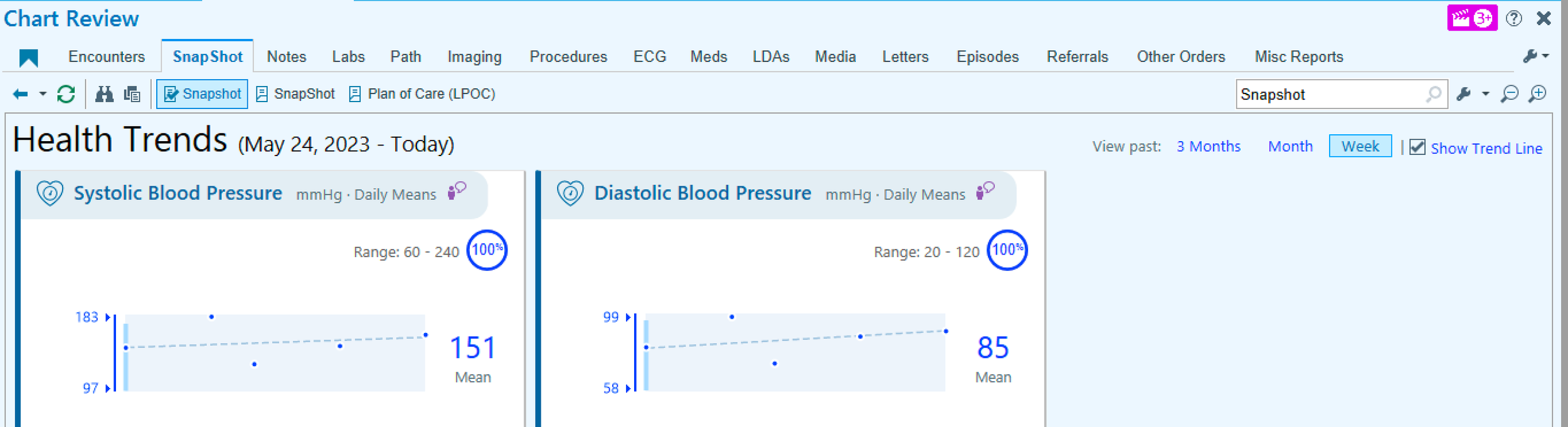
There are several ways to view RPM Hypertension data in Epic. These are the most convenient ways:
Health Trends (found within Patient Snapshot - you might have to scroll down to find it). This is the best way to view trends and average BP. Consider changing the layout of Snapshot so that Health Trends is at the top.
Patient Clinical Update. This is where you will get weekly updates of your patients’ home BP readings
RPM Synopsis provides another view of the data.
Viewing Home BP Data



Managing home BP Data
Clinicians manage home BP data how they think best.
To keep track of patients in RPM Hypertension, don’t click “Done” for a given patient’s message in Patient Clinical Update until you get another message a week later. Then click “Done” on the prior week’s message. This way you will have one message for each patient.
We recommend giving patients feedback on their home BP data every 1-2 weeks, if possible.
For patients with home BP at or close to goal, click on “Msg to Pt” to send a quick “Congratulations!” message through Connect.
For patients with home BP above goal and no upcoming appointments, here are some options:
Schedule patient for an in-person or virtual visit. This way you can bill for your time and not add to your unscheduled time
Send your patient a Connect message with treatment recommendations, especially if you had discussed them in advance.
Call your patient, and count this time toward RPM billing codes to get reimbursed for your effort (see Billing section, below).
Doctors are not expected to respond to very high or very low BP readings right away.
Patients will be monitored for extreme readings by a team of RPM Pharmacists from Monday to Friday, 9am to 5pm. Pharmacists will ask patients to repeat readings and will triage accordingly.
Calls with patients will be documented in Epic, and you and/or your call center will be notified if appropriate.
Since readings are not being monitored around the clock, patients should be instructed to not wait for someone from the program to contact them if they are ever concerned about their BP readings or symptoms.
Extreme BP Readings
BP readings that trigger calls from RPM Pharmacists*
SBP < 90 mmHg or > 210 mmHg
DBP > 130 mmHg
Pulse <40 bpm or >130 bpm
*Alert thresholds can be customized in Epic
Billing
RPM Hypertension is billable under Medicare, Medicaid, and a growing number of commercial insurers including some Managed Medicaid plans through billing codes designed to reimburse for Remote Patient Monitoring (RPM).
Confirm that you are eligible to bill for RPM with your practice manager.
CPT code 99457 can be used by clinicians once per calendar month to bill for 20 minutes of time managing each patient in the RPM-Hypertension program. Reimbursement will count toward RVUs.
CPT code 99458 can be used by clinicians once per calendar month to bill for an additional 20 minutes of time managing each patient in the RPM-Hypertension program for those patients getting intensive management.
Reimbursement amount:
Medicare/Medicaid: ~$50/mo (1.5 RVU)
Commercial insurer: ~$150/mo (4.5 RVU)
To bill for CPT 99457, clinicians must do the following:
Use smartphrase .rpmconsent to document that the patient consented to being in the program at the time of referral
At least one calendar month later, open a telephone note and use smartphrase .rpmbill to document that a clinician and/or a member of the clinicians’s team (e.g., nurse, pharmacist, navigator) spent at least 20 minutes cumulatively over the calendar month managing hypertension with the benefit of the Epic-integrated home BP data. This time must include at least some synchronous communication (e.g., telephone call) between a clinician (or member of the clinician’s team) and the patient that is not being billed for separately. Type 99457 in the Charge Capture section.
A similar process can be used to bill for CPT 99458 if an additional 20 min (or 40 min total) is spent managing the patient in a single calendar month. Use smartphrase .rpmbillextra. This is expected to be uncommon.
If bills are placed, patients with Medicare or commercial insurance may be charged a co-pay.
In the future, there may be the option to also bill insurers for the cost of the wireless monitoring equipment using CPT codes 99453 and 99454 which could result in additional monthly co-pays for patients.
Detailed protocols for billing are being developed in conjunction with compliance officials.
How many RVUs can I earn with RPM Hypertension?
Refer 5 patients to program for 6 months each
Bill for 4 calls per patient at 1.5 - 4.5 RVUs/call
Total = 30-90 RVUs for 20 calls across 6 months (<1 call per week)
Timeline & Program Length

With this program, you should be able to get your patient’s BP under control within 6 months.
After the program ends, your patient will be expected to return the home BP equipment by delivery service.
Help your patient obtain their own validated home BP device. You can find validated devices on the website ValidateBP.org.
Ask your patients to continue to track their BP at home in the week before each office visit to make sure it is stays under control at home.
How long does the program last
The standard program lasts 6 months for each patient.
You or your patient can end the program anytime.
Patients who are non-compliant with home BP readings or who are not available for pharmacist calls due to travel or other reasins may be discharged early.
The RPM Navigator will contact you when your patient reaches 6 months to ask if you want to extend or discontinue the program.
You can re-refer your patient at any time.
Discharging your patient from the program
Only ordering clinicians can officially discharge patients from the program
To do so, create a new Documentation Encounter, then 1) place the Disenroll order, and 2) Resolve the Episode of Care as show in the screenshots below.
This enables the patient’s home BP device to become available to another patient and prevents new home BP readings from transmitting to Epic.
1. Create a new “Documentation” Encounter. Search for Disenroll - Current Health RPM order. Enter I10 for Dx association. Accept.
2. Go to Episodes of Care and click on Resolve.
Navigators make sure your patient can get started on and stay on track with home BP monitoring. They are not medical staff. There are 2 types of navigators, RPM Navigators and the Current Health Support Team (also called the Pulse Team)
RPM Navigator responsibilities :
Contact patients after they are referred to review what to expect, to confirm that RPM Hypertension is a good fit, and to confirm information for device delivery. If patients already have their own home BP device and are comfortable using the patient portal, Navigators might recommend that patients switch to MyCare Hypertension.
Contact referring clinicians at 6 months to find out whether they want to extend or discontinue the program.
Be available by phone or secure chat for general questions about the program from clinicians or patients.
Current Health Navigator responsibilities:
Teach patients how to set up and use the home BP device and Samsung tablet
Teach patients the correct way to measure BP at home (e.g., rest for 5 minutes before taking a reading, no talking, etc…)
Be available for technical questions about the devices, including malfunctions
RPM Pharmacists monitor home BP data for extreme readings. They are clinical pharmacists hired by our NYP health system.
RPM Pharmacist responsibilities:
1. Monitor home BP data from 9am - 5pm, Monday-Friday.
2. If readings exceed thresholds, call patients to repeat readings and assess for concerning symptoms.
3. Follow standard triage protocols and refer symptomatic patients for urgent care, when appropriate.
4. Relay patient concerns (e.g., need for refills) to practice-specific nursing pools or clinicians, when appropriate.
Role of Navigators & Pharmacists
Schedule short-term (e.g., 1 month after referrral) follow-up visits to ensure you have scheduled time to review home BP readings with your patients. This will help ensure that the time you spend caring for patients in the program does not fall into your unscheduled time.
Teach your patient that it’s the average that matters. Patients can be confused by their home BP going up and down. Refer them to the patient section of this web-based resource guide if they have questions.
Review your average BP goal (typically <130/80 mmHg) with your patient.
Discuss possible treatment plans with your patient in advance of knowing the home BP data. This way, when the data arrives, you will already have a plan in place.
Notify specialists that are co-managing hypertension with you (e.g., cardiologist, nephrologist) about the availability of home BP data in Epic.
Best Practices for Success
Case Studies
(all based on true patient cases, though details were altered to ensure patient confidentiality)
-
NV is a 41 yo woman with obesity (BMI 32) and headaches. She recently became your patient when her insurance changed. She recalls being told she had high BP by her prior doctor but never started treatment. She acknowledges being anxious at the doctor’s office.
Office BP visit 1: 152/92
Office visit 2: 135/94, EKG normal SR, no LVH; normal Cr
You refer her to HomeTrackBP after 2nd visit.
Home BP readings in 1st month:
Average home BP 129/79, 20 readings
You call her after 1 month to tell her she has elevated BP, but not hypertension (as per AHA/ACC guidelines)
You agree together that she will work on increasing walking, decreasing portion size, and speaking with the nutritionist about the DASH diet
You recommend she continue monitoring her BP at home as she is at increased risk for transitioning to stage 1 hypertension by virtue of having white-coat hypertension.
You recommend a low-cost validated home BP device: Omron-3 series (~$50 Amazon or CVS)
You bill for time 20 min spent doing home BP monitoring: CPT 99457
2 years later, she comes to urgent care after being found to have severely elevated BP in dentist office: (BP 182/112), but no symptoms of headache or chest pain.
At walk-in visit, office BP still elevated 172/108.
You re-refer her to HomeTrackBP.
This time, home BP 144/95, 16 readings
You initiate amlodipine 5mg/HCTZ 12.5 mg
One month later, home BP 127/78, no titrations were necessary
Take Home Points:
RPM-Hypertension is useful for assessing white-coat hypertension (BP elevated in office, but non-elevated at home)
Patients with white-coat hypertension are at increased risk of converting to sustained hypertension and will benefit from periodic home BP monitoring
Lifestyle recommendations are still important for patients with elevated BP
Prescribe validated home BP devices, use ValidateBP.org to find validated devices or become familiar with a commonly available accurate device
Initiate combinations of 2 BP medications in patients with stage 2 hypertension. This leads to less need for multiple titrations to get patients to goal and higher patient satisfaction.
-
AZ is a 69 yo M, still works as superintendent of an apartment bldg, has mild OA
Medications: acetaminophen, amlodipine 10, HCTZ 25, lisinopril 40
Office BP 146/94
You refer to HomeTrackBP to determine if he needs more BP medications.
Home BP readings in first month:
Average home BP: 142/92, 18 readings
Normal Cr, l, K+4.2; aldo 10, renin 1.4
He misses his follow-up appointment, but you catch him on his cell phone.
He agrees to trialing eplerenone 25mg.
You bill for 20 min time spent doing home BP monitoring: CPT 99457
Average home BP 1 month later: 135/88, K+4.3
You call him, and he agrees to uptitrate eplerenone to 50mg
You bill for time spent doing home BP monitoring: CPT 99457
You see him in your office 6 weeks later
You review his home BP data and labs in advance of his visit
Office BP 135/88; home BP 128/76; normal renal panel
You congratulate your patient on getting his BP under control
You continue RPM-Hypertension for 6 months total to ensure consistent BP control
Although the office visit only took 15 min (99212), you bill for 20 min of work to encompass the additional time you spent reviewing home BP data in advance of visit (99213)
Take Home Points
1. RPM-Hypertension is useful for confirming patients have true resistant hypertension and benefit from adding a 4th medication
2. RPM-Hypertension is proven to promote appropriate medication titrations
3. Time spent reviewing data for home BP monitoring can be incorporated into E&M upcoding if done on same day as the office visit
-
DJ is a 49 yo M with a family history of early MI and stroke, He has DM on metformin, and hypertension. He is overweight: BMI 29
He is prescribed lisinopril 40, HCTZ 25, amlodipine 10
Office BP: 141/91; Normal renal panel, K+ 4.8
You refer patient to HomeTrackBP
Average home BP 1 month later: 140/92, 18 readings
You call patient to discuss treatment options, including adding carvedilol which would be a twice a day medication. He declines to increase his medications, and said he wishes to test out his ideas for better lifestyle management, including reducing salt in his diet, controlling his stress with meditation, and using a pillbox to help avoid forgetting his medications.
Average home BP at Month 2: 134/82, 16 readings.
Your nurse calls patient on your behalf to discuss results and treatment options. Patient again declines to initiate more BP medication. He prefers to continue to work on lifestyle changes.
You document the outcome of the conversation with the nurse, and bill for team’s total time spent doing home BP monitoring: CPT 99457
You see patient in the office again at 3 months
Office BP 134/84, average home BP in Month 3: 129/79, 18 readings.
BMI now 27
You congratulate your patient on achieving controlled BP and weight loss.
You recommend ongoing monitoring with HomeTrackBP through 6 months.
Take home points:
RPM-Hypertension is proven to increase patient adherence to medications and lifestyle
Many patients like to use RPM-Hypertension to test out their ideas for lowering BP without medication
The time your staff (nurses, assistants) spends related to home BP monitoring counts toward the total 20 min requirement for CPT 99457
At least some synchronous communication (e.g., telephone or video call) with patients is required to bill for RPM. MyChart messages, alone, are not sufficient.
-
ZZ is a 72 yo M with long standing hypertension, stage 4 CKD, CAD, and IDDM.
His office BP is 162/88.
BP medications include: chlorthalidone 25, nifedipine ER 90, furosemide 20
Renal panel has Cr 2.8, K+ 4.8
You refer patient to HomeTrackBP.
Average home BP 6 weeks later: 148/95, but home BP readings range from 104/66 to 180/112 and pulse ranges from 60-88.
Patient describes occasional dizziness, but not clearly related to when he has low BP readings.
Patient has good understanding of his BP medications and uses a pillbox.
You review his prescription fill data in Epic and see all his BP medications have recent fill dates
You add carvedilol 6.25 bid.
Average home BP 3 months later: 144/92, home BP readings range from 96/56 to 178/110 and pulse ranges from 48-88.
You eConsult Hypertension center for advice on titrating his BP regimen.
You refer patient to nephrology for assistance managing his CKD and uncontrolled, labile BP.
Take Home Points:
RPM-Hypertension can identify challenging patients with true resistant hypertension and labile home BP readings
Epic can be used to determine whether patients are filling their BP medications.
Use a team approach to try to get these challenging, high-risk patients to goal.
E-consult for hypertension can be used for quick advice on challenging hypertension cases.
Consultants that may be helpful for co-managing complex hypertension include:
• pharmacists, especially helpful for medication reconciliation and adherence counseling
• cardiologists or nephrologists if underlying CKD
• Columbia Hypertension Center, includes cardiology and nephrology experts in hypertension management (Epic order, 212-342-1273 or https://www.columbiadoctors.org/specialties/cardiology-cardiac-surgery/our-services/hypertension-center)
Other Resources to Help Manage Hypertension
Refer complex patients to the Columbia Hypertension Center: https://www.columbiadoctors.org/specialties/cardiology-cardiac-surgery/our-services/hypertension-center
E-Consult for Hypertension for focused questions about hypertension management
Validated home BP device listing: go to website https://ww.w.ValidateBP.org to find out if your patients is using a validated device
Refer to pharmacist for medication reconciliation or hypertension co-management (only available at some clinics)
Order MyCare Hypertension or Connect BP Flowsheets to continue monitoring your patients’ home BP after RPM Hypertension loaner program ends
FAQs
-
This could be due to a device malfunction or due to patients not pressing a button on their tablet before taking a home BP reading. The home BP readings will only transmit to Epic if the patient first connects the BP device to the tablet via Bluetooth
Either way, ask the patient to call the Current Health support number (844-611-2232 ).
-
For patients who prefer to self- measure their home BP without the benefit of RPM Hypertension, you can order MyCare Hypertension or Connect Blood Pressure Flowsheets. This will prompt patients to enter their BP readings into MyChart.
These BP readings will we sent to your In-Basket on a weekly basis and will be visible in Health Trends in the same way as RPM Hypertension.
-
Guidelines recommend that patients continue to monitor their BP at home even after RPM Hypertension ends.
Advise your patient to use a validated upper arm home BP device. Find validated BP devices on https://www.validatebp.org/
Recommend your patient self-measure and track their home BP in the week before office visits.
Consider ordering MyCare Hypertension or Connect Blood Pressure Flowsheet in Epic; this will prompt your patient to enter their home BP readings in Connect/MyChart so you can have access to home BP readings in Epic
There are separate CPT codes for obtaining self-measured BP data that is not delivered wirelessly from home BP devices. To learn more: https://www.ama-assn.org/system/files/2020-06/smbp-cpt-coding.pdf
Patients can be referred to RPM Hypertension a second time if their BP becomes uncontrolled.
-
Just because a home BP device is commercially available and “FDA cleared” does not mean it is accurate.
Experts recommend patients use a home BP device on a validated device listing (http://ValidateBP.org). Experts also recommend asking your patients to demonstrate how they measure their BP with their home BP device and to check the accuracy of their device as compared to a validated device in your office if the patient’s device is not on the validated device listing.
If you want to recommend a specific brand, we recommend the Omron-3 or A&D Essential as low-cost high quality devices and the Omron-5 wireless or A&D Wireless for patients that want wireless data that comes with apps on their phone.
It is also important to choose the correct BP cuff size. If the cuff is too small, it could artificially inflate the BP by 20 mmHg or more.
New York State should cover the cost of low-cost home BP devices, but Managed Medicaid plans may require a letter of medical necessity. Your social worker may be able to help your Medicaid-insured patients get a home BP device at no charge.
You can bill for the time you or a member of your office spent educating patients on appropriate device use, by using CPT 99473. You cannot bill for this on the same day as an E&M visit. This type of visit can reimburse $11 from Medicare/Medicaid and up to $33 by commercial insurers.
-
There are no restrictions, but rI10 (hypertension) and R03.0 (elevated BP without a diagnosis of hypertension) are the ones I most commonly use. For example, one could use I95.0 (hypotension) or R42 (dizziness) if those indicated more careful monitoring.
-
No, the program is not limited to those with uncontrolled hypertension. The program might be a good tool when there is a mismatch between the office BP readings and the patient’s at-home BP readings. Additionally, you might refer patients whose office BP is always up and down and you want to monitor them closely.
-
For RPM Hypertension, patients are loaned devices for 6 months. As the 6-month time point comes near, the navigator will contact the referring clinician to give them anextend opportunity to the program so long as patients are actively checking their home BP. I recently had a patient who finally agreed to intensify her medication regimen and extended her program by 3 months to see how it was working.
For MyCare Hypertension, the program in which patients use their own device, they get prompts to review education modules and track their home BP for 3 months. But they can continue to track their home BP readings using a structured flowsheet indefinitely. Referring clinicians can discontinue the flowsheet so that they are not responsible for reviewing the weekly data at any point (or they can modify the flowsheet so that they only get the list of home BP readings on a monthly or longer basis).
-
Billing applies to RPM Hypertension. Clinicians can refer patients with any type of insurance. Unless the clinician remembers to follow our instructions about billing, patients will not be billed and clinicians will not receive any RVUs.
We have heard that billing is mostly going smoothly. Some patients decline the RPM program when they learn they might be billed. MyCare Hypertension is a good back-up option. But most still agree. Commercial insurers are typically reimbursing $150 (4.5 RVUs) when clinicians bill CPT 99457 for spending ~20 min cumulatively for managing patients with remote hypertension data across a 30-day period.
We have detailed instructions on how to do billing in our Billing section of the website.